FMOD Studio User Manual 2.03
- Welcome to FMOD Studio
- FMOD Studio Concepts
- Organizing the Project
- Authoring Events
- Working with Instruments
- Managing Assets
- Parameters
- Getting Events into Your Game
- Mixing
- The Sandbox
- Editing During Live Update
- Profiling
- Dialogue and Localization
- Using Source Control
- Supporting Downloadable and User-generated Content
- Advanced Topics
- Quick Start Tutorial
- Effect Reference
- Event Macros Drawer Reference
- Instrument Reference
- Keyboard Shortcut Reference
- Modulator Reference
- Parameters Reference
- Plug-in Reference
- Scripting
- Scripting API Reference
- Troubleshooting
- Glossary
- Appendix: Celeste Getting Started Guide
- Appendix: Reaper Integration
1. Welcome to FMOD Studio | New in FMOD Studio 2.03
What's New in FMOD Studio 2.03?
FMOD Studio 2.03 brings support for mixing and bypassing effects in real time, gives you more information about your project than ever before with new profiler features and a spectrum analyzer effect, and expands your sound design toolbox with the spectral sidechain modulator, multiband dynamics effect, and a way to add seek speed to everything.
On top of all the new features, we've made a host of improvements to stability, performance, and ease-of-use. For a full and detailed list of all changes, see the detailed revision history.
Multiband Dynamics
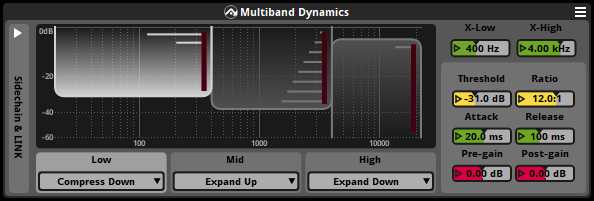
The new multiband dynamics effect is a powerful and flexible tool for dynamically adjusting a signal. With options for both compressing and expanding specific frequency bands, it can tweak a signal any way you please.
Nearly every property of the multiband dynamics effect - from the bounds of the frequency bands, to the compression/expansion ratio, to the pre- and post-gain of each individual frequency band - can be automated and modulated, allowing the compression/expansion profile of the signal to change in real time as your game runs.
For more information about the multiband dynamics effect, see the Multiband Dynamics entry of the Glossary.
Spectral Sidechain Modulator
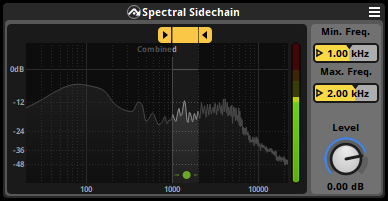
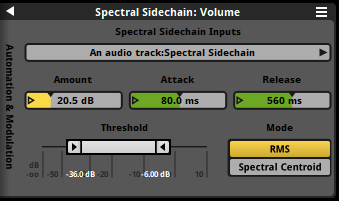
The spectral sidechain modulator and spectral sidechain effect work together achieve an all new form of modulation. The spectral sidechain effect lets you specify a specific frequency range of a signal to follow, and the spectral sidechain modulator lets you adjust another property based on the level of that followed signal.
These new tools enable a variety of sound design possibilities, from automatically ducking background walla when playing songs with lyrics and string instruments, to dynamically remixing the background ambiance to emphasize gameplay-relevant SFX, to triggering commentator barks to fill gaps in the mix.
For more information about the spectral sidechain modulator, see the Spectral Sidechain Modulator section of the Modulator Reference chapter.
Property Seek Speed


Seek speed makes a property's value change gradually instead of instantly when it is set, allowing you to smooth out changes and prevent them from being too abrupt. In previous versions of FMOD Studio, seek speed was a property of parameters, and couldn't be applied to other properties. However, in FMOD Studio 2.03, seek speed is now a modulator that can be applied to nearly any property, making seek speed more flexible and powerful than ever before.
For more information about property seek speed and the seek modulator, see the Seek Modulator section of the Modulator Reference chapter.
Dynamic Effect Bypass and Wet/Dry Levels
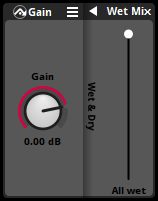
In FMOD Studio 2.03, every effect now has wet and dry mix controls that let you precisely customize how the original signal and effect-processed signal are mixed to create the effect's final output. To see these new controls, just right-click on the effect and select "Enable Wet/Dry" from the context menu.
In addition to giving you more power over your project's mix, this new feature also makes it possible to bypass effects in real time as your game runs! Any effect whose wet mix or wet level is reduced to 0% is automatically optimized away, reducing resource consumption, until that property becomes positive again.
For more information about effect wet and dry mix and dynamic effect bypass, see the Input Gain and Wet/Dry section of the Authoring Events chapter.
Effect Input Gain
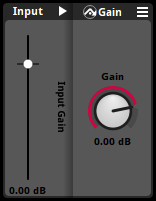
All effects now have an input gain property that allows you to boost or duck the volume of the signal received by the effect.
For more information about input gain, see the Input Gain and Wet/Dry section of the Authoring Events chapter.
Spectrum Analyzer
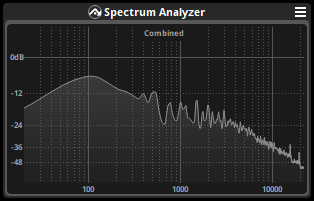
The spectrum analyzer effect is a brand new diagnostic and analysis tool. Just drop it anywhere in a signal chain, and it'll show you the live spectrum of the signal at that point. The spectrum analyzer effect is automatically optimized away whenever your game isn't connected to live update, so this benefit comes at no cost in performance.
The spectrum analyzer complements the new multiband dynamics effect and spectral sidechain modulator by giving you greater insight into your project's frequency distribution at every level of the mix.
For more information about the spectrum analyzer effect, see the Spectrum Analyzer Effect entry of the Glossary.
Improved Profiler Capabilities
In FMOD Studio 2.03, the profiler allows you to inspect and see the resource use of individual instances of referenced events, improving your understanding of how referenced and nested events impact your game's use of resources.
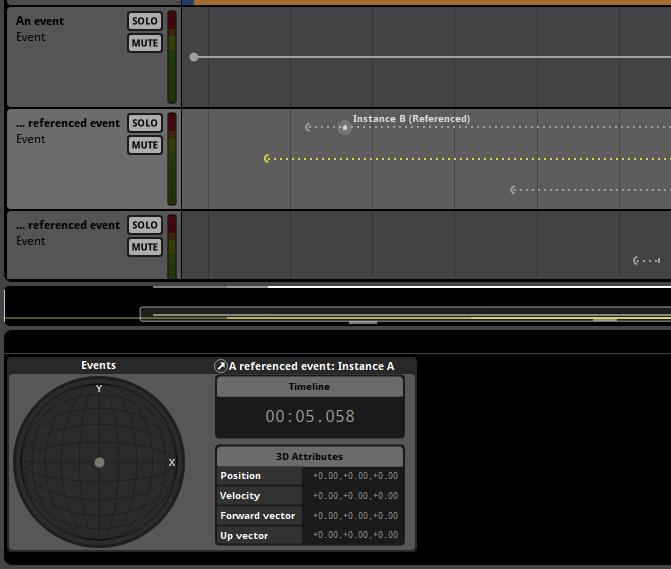
In addition, the profiler window can now display the 3D attributes of individual event instances in the deck, greatly simplifying maintenance and testing of 3D events.

The new instance filtering button allows you to hide virtual event instances in the 3D preview, making it easier than ever before to see where the sound in your project is really coming from.
For more information about FMOD Studio's profiler, see the Profiling chapter.
Live Update with Compressed Assets
In FMOD Studio 2.03, when using live update to connect to a game, audio assets that are added or changed in your FMOD Studio project are sent to the game in compressed format rather than in uncompressed format. This optimization reduces the network bandwidth and disk space required by live update and ensures that your game's audio output and performance will accurately reflect the compression and encoding settings of the updated assets.
For more information about live update, see the Editing During Live Update chapter.
New Playlist Selection Modes
The existing "Sequential - local scope" playlist selection mode of multi and scatterer instruments found in earlier versions of FMOD Studio has been split into two new modes, allowing greater control of how your game handles event instances.
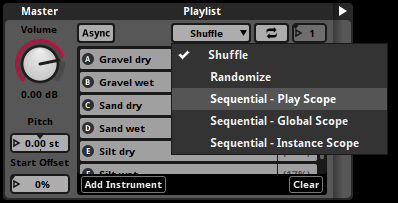
The new "Sequential - play scope" mode counts all the playlist items that have been played in the event instance since it started, allowing you to reset the count by restarting the event instance.
"Sequential - instance scope," by contrast, counts all the playlist items that have been played in the event instance since it was created, regardless of how many times that instance has been restarted since then, allowing you to make an event instance that does something new and different every time it starts to play.
For more information about playlist selection modes, see the multi instrument Playlist Selection Mode and scatterer instrument Playlist Selection Mode sections of the Instrument Reference chapter.
Support for VR Controller Vibration
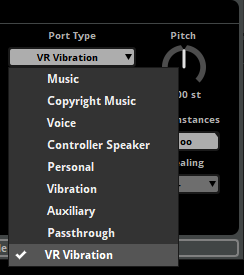
The new "VR Vibration" port bus type means it's now possible to drive compatible VR systems' controller vibrators using content designed in FMOD Studio.
For more information about port buses, see the Port Buses section of the Mixing chapter.
What Else Has Changed in FMOD Studio 2.03?
In addition to the major features listed above, FMOD Studio version 2.03.00 includes some other minor changes.
Terminology Improvements
"Preset effects" have been renamed to "shared effects."
"Preset parameters" have been renamed "parameters." Our documentation now describes each parameter as instanceable and able to be present in more than one event. This replaces the language used in previous versions of our documentation, which described each parameter in an event as being based on a preset parameter.
"Default events" have been renamed to "event presets."
This new terminology better reflects how these features work, and how they can be useful for your FMOD Studio project.
Modulator Clock Source
In all versions of FMOD Studio, each event instance has its own internal clock that determines the rate at which the timeline's playback position advances, and whose speed is dependent on the pitch of that event instance. The mixer also has its own clock that maintains a constant speed.
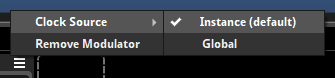
In FMOD Studio 2.03.00, modulators with time-based behavior (including the AHDSR modulator, LFO modulator, and seek modulator) have a new "clock source" property that lets you to determine whether their behavior should be synchronized to the clock of their parent event instance, or to the global clock used by the mixer.
Performance Improvements
In addition to the above changes, FMOD Studio version 2.03.00 includes numerous performance optimizations, bug fixes, and minor usability improvements.
What's New Since the 2.02.00 Initial Release?
Numerous new features were added to FMOD Studio between versions 2.02.00 and 2.03.00:
- Ensured that the "Stream" button in the asset browser is hidden when the selected asset inherits the streaming loading mode from its parent folder.
- Added the ability to reorder port buses and the master bus in the routing browser.
- Added the Output Device FMOD Controller Output for audio and vibration on a PS5 controller on Windows. This can be used for auditioning purposes only.
- Added the
readBinaryandwriteBinaryfile functions to the scripting api. - Added support for adding assets to a multi instrument by dragging and dropping assets onto the multi instrument in the editor pane.
- Added the ability to query all available plugins to the scripting system. This feature is implemented as
studio.project.findAvailablePlugins(). - Added a keyboard shortcut that enables flatten mode in any browser window with a "Flatten" toggle button. By default, this keyboard shortcut is "Ctrl+." .
- Added labels to the "Direction," "Extent," "Axis," and "Width" number boxes found in the track output panner and the pan override drawer of the spatializer effect.
- Added submenus to the mixer strip context menu for adding sends to buses, in order to disambiguate between identically-named return buses with different parent group buses.
- Ensured that hovering the mouse over a folder while dragging an item now expands that folder, if possible.
- Ensured that banks to which an event is already assigned are grayed out when using the "Assign to Bank" context submenu.
- Added the ability to convert a referenced event in the playlist of a multi instrument, scatterer instrument, or action sheet into to a nested event.
- Altered the display of virtual event instances the profiler window to make them more distinct from non-virtual event instances.
- Expanded the variety of search terms available in browser search bars.
- Added a "Add Start and End Points" command to the automation curve context menu when points are not already present at the start and end of the automation curve.
- Added the "Insert Points" command to the automation curve context menu.
- Improved feedback when building banks containing convolution reverb effects whose IR files are unassigned or missing.
- Added the "Continuous Zoom to Fit" mode to the profiler window. Enabling the toggle button for this mode in the transport bar causes the profiler to continually zoom to display the entire profiler session.
- Changed the quantization controls of instruments and logic markers to be labeled with note icons instead of fractions.
- Added the
is3DandisOneShotfunctions to the scripting API. - Added the ability to assign shortcuts to the copy path and copy GUID commands.
- Added support for using translation.qm to create translations of FMOD Studio's interface.
- Added support for adding a programmer instrument by dragging and dropping an audio table onto the multi instrument in the editor pane.
- Added the ability to create a new event with no sheets or content.
- Made events' master bus output panners visible in the mixer window.
- Changed the result of double clicking on a loop or magnet region without a transition timeline to add/toggle a transition timeline, instead of renaming the marker.
- Added more granular options to the display scale setting in the interface tab of the preferences dialog.
- Renamed the "Remove Automation" menu commands to "Remove All Automation," to better reflect their behavior.
- Renamed the "Stereo" project platform surround speaker mode to "Headphones", to more accurately reflect its behavior and intended use.
- Gave FMOD Studio the ability to remember and reload window open states and locations after exiting and then re-launching the application. This is enabled by default but can be disabled in the preferences dialog.
- Added support for Opus encoding format and made it the default encoding format for the PS5 platform.
- Updated migration of FMOD Studio 2.01 projects to copy the min & max distance properties of shared/preset to the min & max distance properties of events using those effects.
- Added support for adding curves for one or more parameters to an automation widget by dragging and dropping those parameters onto the widget.
- Altered the event macro min & max distance properties to always be visible in 3D events, but to be disabled if not actually used by any effect or parameter.
- Added the "Import Assets..." command to the assets browser's context menu.
- Added support for 115% device pixel scale factor display setting.
- Added support for using the "Assign to Bank," "Remove from Bank," "Add to Presets," and "Refresh Output Format" context menu commands on all events in a folder or multi-selection.
- Added support for added PipeWire-Pulse as alternative dependency to PulseAudio on Linux.
- Added
studio.system.readDirto the scripting API. This returns a list of directories and files in a specified directory. - Added a platform build setting to ensure each asset within a bank is aligned to a 4K boundary, to better support binary patching on Microsoft platforms.
- Numerous performance optimizations, bug fixes, and minor usability improvements.